

From Simple Prompts to Autonomous Agents

A Practical AI Roadmap for the Cautious Canadian Business Owner
If you run a business in Canada and you've mostly been watching the AI conversation from the sidelines, you're in good company. A lot of business owners tried a chatbot once, asked it something underwhelming, and quietly went back to doing things the old way. That's a fair reaction to where things were even a year or two ago. But the technology has moved through several distinct stages since then, and each stage does something meaningfully different for a business than the one before it. This article walks through those stages in order, from the simplest possible use — typing a question and getting an answer — up to the most advanced — software that takes action on your behalf while you sleep. Along the way, we'll use examples drawn from the kinds of businesses that make up most of the Canadian economy: independent retailers, trades and contractors, bookkeeping and professional services, and small manufacturers. The goal is not to turn you into a programmer. It's to give you an accurate mental map, so that when someone mentions "AI agents" or "MCP" at a Chamber of Commerce breakfast, you know exactly where that fits and whether it's worth your time.
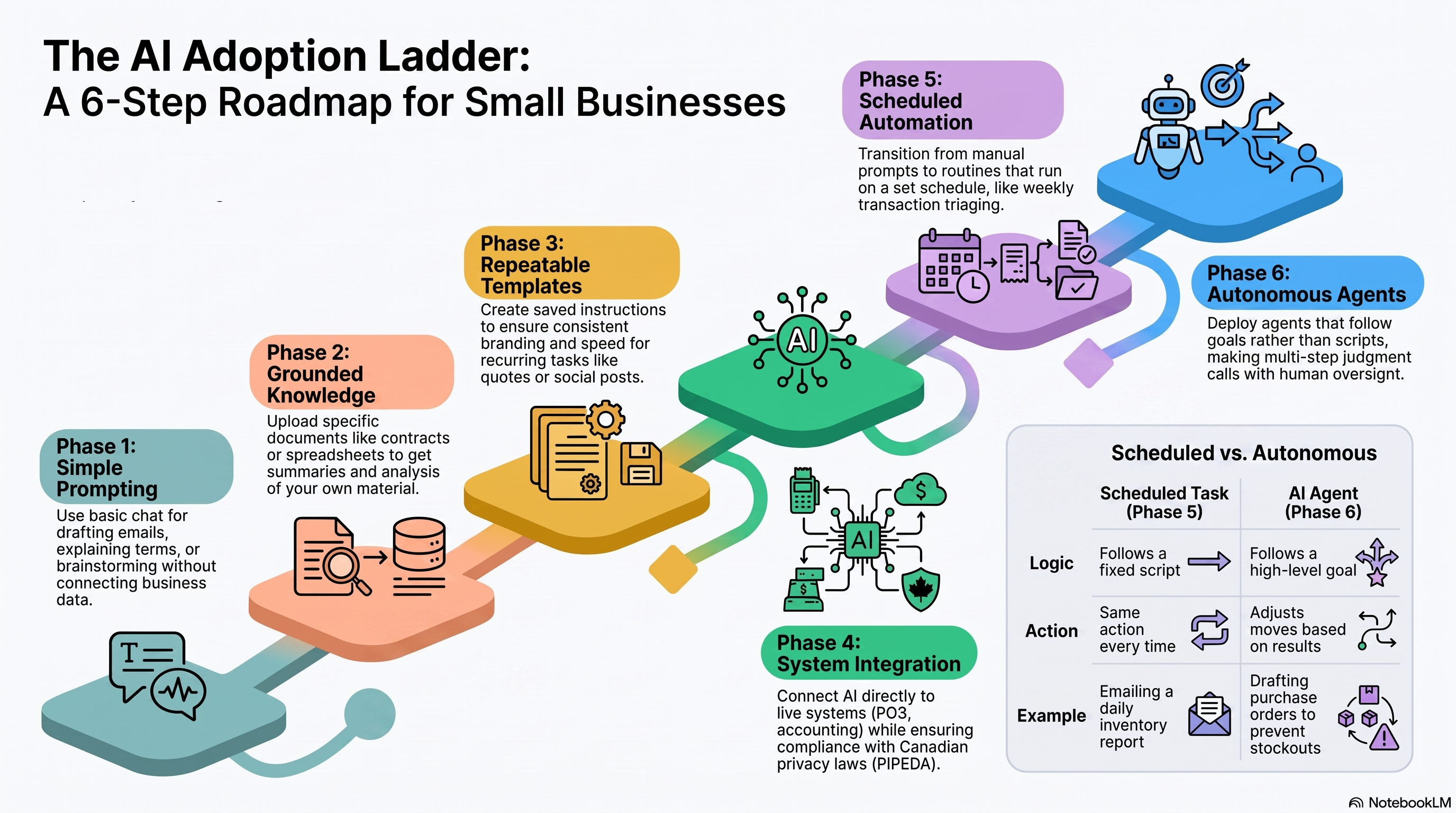
Phase 1: Just Asking Questions
This is where almost everyone starts, and it's still the most common use of AI today: you open a chat window, type something in plain English, and get a written answer back. No files, no logins, no setup. This is what most people mean when they say "I used ChatGPT" or "I asked Claude."
Picture Marie, who runs a small landscaping company outside Kitchener, Ontario. She's drafting a price increase letter to send to her recurring maintenance clients and isn't sure how to phrase it without sounding apologetic or, worse, greedy. She types the situation into a chat window — "I need to raise my lawn care prices by 8% for next season due to fuel and labour costs, write a short, professional letter to existing clients" — and gets back a draft in about ten seconds. She edits a few lines to sound more like herself and sends it.
That's the entire interaction: a prompt in, a response out, nothing remembered, nothing connected to her business systems. It's genuinely useful for drafting emails, explaining unfamiliar terms (what actually is a "holdback" on a construction contract?), brainstorming names for a new product line, or getting a second opinion on wording. The limitation is equally simple: the AI only knows what you type into the box. It has never seen Marie's client list, her invoices, or her actual letterhead. Every conversation starts from zero.
This phase alone is worth adopting even if you go no further. It costs nothing to try, there's no integration risk, and the failure mode is mild — a mediocre first draft you edit, not a business process that breaks.
Phase 2: Giving It Your Own Material
The next step up is showing the AI something specific to your business — a document, a spreadsheet, a contract — instead of relying only on general knowledge. This is still a single conversation, but now it's grounded in your actual paperwork.
Consider Devan, who owns a small hardware store in Nanaimo, British Columbia. A supplier sends over a 40-page distribution agreement full of dense legal language about minimum order quantities and exclusivity terms. Rather than reading all 40 pages or paying a lawyer $400 to summarize it before he's even decided if it's worth pursuing, Devan uploads the PDF and asks for a plain-English summary of the key obligations and any unusual clauses. In a couple of minutes he has a one-page summary of what he's actually agreeing to, which he can then take to his lawyer with informed, specific questions — saving billable time rather than replacing legal advice entirely.
Or take Priya, a bookkeeper in Halifax who has a messy spreadsheet of a client's expenses with inconsistent categories, blank cells, and a few obvious typos. She hands it over and asks the AI to clean it up, standardize the category names, and flag anything that looks like an error. What would have been ninety minutes of tedious manual cleanup becomes a five-minute review of AI-suggested corrections.
This is still fundamentally one conversation with one file at a time. But notice the shift: the AI is now working with your material, not just its general training. This is also typically where people start producing finished documents — a polished Word file, a spreadsheet, a slide deck — rather than just chat text, because the tools have gotten good at generating properly formatted files, not just paragraphs on a screen.
Phase 3: Repeatable Templates and Instructions
Once you're doing the same kind of task more than once, retyping your instructions every time becomes its own kind of waste. This is where "skills" or saved templates come in — a set of instructions you write once that the AI follows every time afterward, so the output is consistent without you re-explaining your preferences.
Take Marie's landscaping business again. She sends a similar quote to prospective clients every week: a fixed structure with her rate card, standard terms, and a friendly closing paragraph. Instead of describing that format from scratch each time, she sets it up once — "always use this letterhead, this rate structure, this tone, and close with this specific line about our satisfaction guarantee" — and from then on, generating a new quote takes one line of input instead of ten.
A restaurant owner in Montreal might do the same thing for weekly social media posts: once the AI knows the restaurant's voice, its usual specials format, and which emoji it does and doesn't use, producing five posts for the week takes a couple of minutes instead of an hour of writer's block.
The business value here isn't a new capability — it's consistency and speed. You're no longer starting from a blank page every single time, and importantly, the output stops drifting: your fifteenth quote sounds as professional and on-brand as your first.
“The goal is not to adopt every AI capability at once. Start with one useful task, confirm that it works, and move to the next step only when the value—and the trust—are clear.”
Phase 4: Connecting to Your Actual Business Systems
Every phase so far has one thing in common: you had to manually copy information in — pasting text, uploading a file. The next real leap is letting the AI reach directly into the systems you already use — your accounting software, your point-of-sale system, your email, your calendar — so it can pull current information itself. This connection layer is often called an "MCP connector" or simply a "connector" or "integration," but the plain-language version is: it gives the AI permission to look something up on your behalf, live, instead of you telling it.
Suppose Devan, the Nanaimo hardware store owner, wants to know how last month's revenue compares to the same month last year, broken down by category. Without a connector, he'd export a report from his POS system, clean it up, and paste it into a chat. With a connector to his POS or accounting platform, he can simply ask the question directly, and the AI retrieves the actual numbers itself and gives him the comparison — no export, no copy-paste, no risk of grabbing a stale file.
Or picture a small manufacturer in Winnipeg who wants to know, at a glance, which purchase orders from suppliers are overdue. Connected to their inventory system, the AI can check current order statuses on demand rather than the owner manually cross-referencing three spreadsheets.
This is also the point where Canadian-specific considerations start to matter more directly. Once you're connecting an AI tool to systems that hold customer or employee personal information, you're squarely in PIPEDA territory (Canada's federal private-sector privacy law, with Quebec, B.C., and Alberta having their own similar provincial laws). Before connecting anything holding customer data, it's worth checking where that data is processed and stored, whether the vendor is transparent about it, and whether your existing privacy policy needs updating to reflect a new third party touching customer information. This isn't a reason to avoid the technology — it's simply the same due diligence you'd already apply to any new cloud software vendor.
Phase 5: Set It and Forget It
Up to now, every example has required you to start the conversation. The next stage removes that requirement entirely: you set something up once, and it runs on a schedule without you prompting it — every morning, every Monday, every hour, whatever cadence makes sense.
Priya, the Halifax bookkeeper, sets up a Monday-morning routine: pull last week's transactions across her three biggest clients, flag anything that looks miscategorized or unusually large, and email her a short summary before she's even opened her laptop. She still reviews and makes the actual accounting decisions — the AI is doing the first pass of triage, not the judgment calls.
A small retailer might set up a daily 8 a.m. check of overnight online orders and low-stock alerts, delivered as a short summary rather than requiring a login to three different dashboards before coffee.
The shift here is subtle but important: you've gone from "a tool I use" to "a process that runs on its own schedule, whether or not I remember to trigger it." That's genuinely valuable for anything you'd otherwise forget to check regularly — but it also means you should periodically audit what's running and why, the same way you'd periodically review any recurring bill or subscription.
Phase 6: An Assistant That Takes Action on Its Own
This final stage is what people usually mean by "AI agents," and it's the one generating the most hype and the most confusion. The defining feature isn't that it's smarter — it's that it can take a multi-step task, work through it, check its own results, and adjust its next move, without you specifying every single step in advance. A simple tool follows a script. An agent follows a goal.
Here's a concrete comparison. A scheduled task (Phase 5) might check inventory every morning and email you a report — that's fixed and predictable, the same action every time. An agent doing inventory management would instead be given a goal: "keep stock of our top 20 SKUs from running out." It checks levels, cross-references how fast each item is selling, decides which ones are trending toward a stockout, drafts purchase orders to the right suppliers at the right quantities, and — critically, for anything involving real money — holds those orders for your approval rather than sending them automatically. It's making judgment calls at each step, not just executing one fixed instruction.
A second example: a small software consultancy in Toronto could use an agent to triage its support inbox. Instead of a fixed autoresponder, the agent reads each incoming request, checks the client's account history and current plan in the company's systems, decides whether the issue is routine enough to answer directly or needs escalation to a person, drafts a response either way, and logs what it did — genuinely working through a decision tree rather than following one script.
A third: a general contractor in Calgary managing several projects could use an agent to reconcile subcontractor invoices against signed work orders, flagging discrepancies for human review instead of the contractor manually checking every line of every invoice.
This is also where you should apply the most caution, not the least. The more autonomy you hand over, the more important it becomes to keep a human in the loop for anything irreversible — sending money, making a purchase, replying to a customer complaint that needs a personal touch. The sensible pattern for most small businesses isn't full autonomy on day one; it's "let the agent do the work, but ask before it acts," and only loosening that leash once you've seen it get things right consistently over time.
Putting the Ladder Together
Laid end to end, the six phases form a fairly natural progression: ask a question, then ground the answer in your own documents, then make your instructions reusable, then connect it to your live business data, then let it run on a schedule, then let it act with judgment on your behalf. Each rung adds real capability, but also adds a bit more setup and a bit more responsibility for oversight. None of it requires jumping straight to the top.
For a Canadian business owner starting from zero, a reasonable path over the next few months looks something like this:
- Start with plain conversations for drafting and explaining things — no cost, no risk, immediate value.
- Upload a real document or spreadsheet you're currently handling manually and see how much time it saves.
- Identify one task you do the same way every week (a report, a quote, a social post) and turn your instructions into a reusable template.
- Before connecting any business system, confirm where your customer data will be processed and check it against your privacy obligations under PIPEDA or your provincial equivalent.
- Once comfortable, connect one low-risk system and automate one recurring check-in, like a weekly summary.
- Only after that's proven reliable, consider a task-completing agent — and keep a human approval step on anything involving money or customer-facing communication.
None of this requires becoming a technologist. It requires the same instinct you already use when evaluating any new supplier, employee, or piece of equipment: start small, verify it actually helps, and expand only once you trust it. The businesses getting real value out of this technology right now aren't the ones that adopted everything at once — they're the ones that climbed the ladder one rung at a time, at their own pace, and stopped exactly where it stopped making sense for them.